Choosing the right WiFi electricity usage monitor can make energy use easier to understand and cheaper to manage. Whether you want simple plug-in tracking or whole-home circuit monitoring, the best options turn power data into practical savings.
This roundup focuses on reliable monitors for different homes, budgets, and installation needs, so you can quickly narrow down the model that fits your setup.
Best 10 WiFi Electricity Usage Monitor Picks for 2026
Smart Cloud Energy Manager
WiFi Electricity Usage Monitor for Appliance Tracking
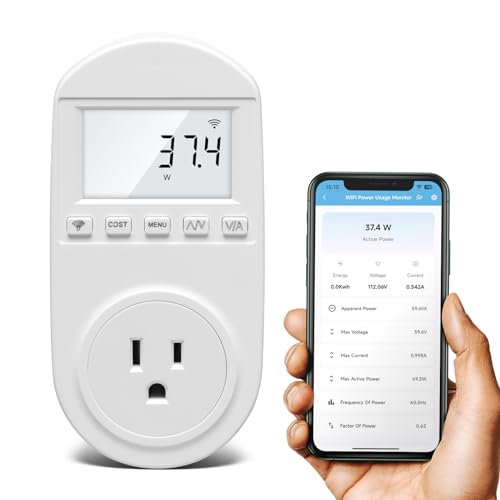
- Real-time app tracking of watts, kWh, current, and runtime
- Cost forecasts by hour, day, week, month, or year
- Overload threshold from 0–3000W with sound and app alerts
Best For: Appliance-level monitoring with remote cost and alarm tracking
Easy Smart Outlet
WiFi Electricity Usage Monitor with Voice Control

- Real-time tracking of power, current, and voltage
- Alexa and Google Assistant compatible
- Timers, scheduling, and remote control in the Govee app
Best For: Simple smart plug control with energy monitoring
Whole-Panel Precision
Refoss Smart Home Energy Monitor with 16x60A Sensors
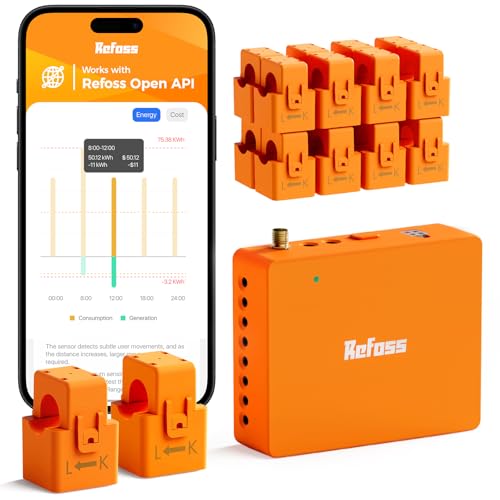
- Monitors 18 circuits with ±1% precision
- Local Web UI, Open API, MQTT, and WebSocket
- 5-year daily data storage and CSV export
Best For: Detailed circuit-by-circuit monitoring with local control and solar tracking
Dual-Circuit Simplicity
Smart Home Energy Monitor 2×120A for Tuya
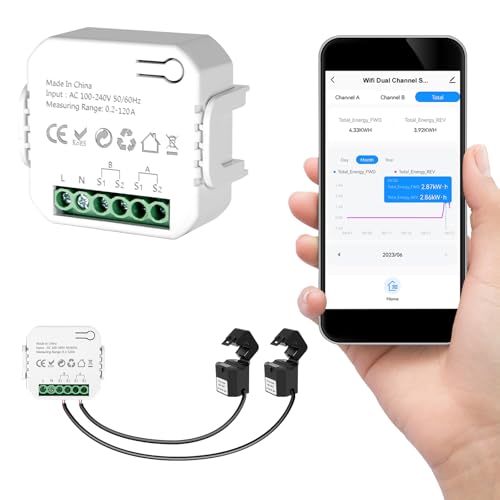
- Two-channel monitoring for major loads
- Works with Tuya and Smart Life apps
- Bi-directional tracking for solar or backup systems
Best For: Straightforward monitoring of two high-load circuits or appliances
Local Privacy Pick
Refoss Smart Home Energy Monitor with Open API

- Local Web UI, Open API, and MQTT access
- Native Home Assistant support
- Up to 5 years of daily data with export
Best For: Local-only energy monitoring with Home Assistant integration
Dual-Circuit Home Tracking
Smart Home Energy Monitor 2×80A

- Two 80A clamp channels
- Tuya/Smart Life app monitoring
- Bi-directional solar/backup tracking
Best For: Homes that only need to monitor two major circuits
Full-Panel Circuit Control
Meross Smart Energy Consumption Monitor

- Tracks 18 circuits total
- Home Assistant support and smart alerts
- No subscriptions, local data
Best For: Whole-home monitoring with detailed circuit-level tracking
Trusted Whole-Home Monitoring
Emporia Vue 3 Home Energy Monitor

- UL Listed for safety
- 16 branch sensors included
- Supports solar and net metering
Best For: Homeowners wanting certified whole-home monitoring with solar support
Smart Cloud Energy Manager – WiFi Electricity Usage Monitor for Appliance Tracking
If you want a WiFi electricity usage monitor that focuses on appliance-level insight, this Zuomeng plug-in meter is built for real-time tracking and cost awareness. It works with the GeniLife app so you can check power use remotely, review trends, and spot expensive run times on appliances like refrigerators or air conditioners.
Best For: Homeowners who want remote appliance monitoring, bill tracking, and overload alerts.
Pros:
- Real-time app monitoring of watts/VA, kWh, runtime, current, and more
- Cost forecasts by hour, day, week, month, or year in the GeniLife app
- Custom overload threshold from 0–3000W with audible, visual, and app alerts
- Works with refrigerators and other household appliances for energy analysis
Cons:
- Designed for plug-in appliance monitoring rather than whole-panel energy tracking
- Uses the GeniLife app, so buyers should be comfortable with its ecosystem
Overall, this is a practical pick if your goal is to measure individual appliance usage and get straightforward electricity bill visibility without a complicated setup.
Easy Smart Outlet – WiFi Electricity Usage Monitor with Voice Control
This Govee smart plug is a simple WiFi electricity usage monitor for anyone who wants energy data and basic automation in one outlet. It tracks real-time power, current, and voltage in the Govee Home app, while also adding scheduling, voice control, and remote access for everyday household devices.
Best For: Users who want an easy smart plug with energy monitoring, Alexa/Google support, and timers.
Pros:
- Tracks real-time power, current, and voltage with daily, weekly, monthly, and yearly views
- Works with Alexa and Google Assistant for voice control
- WiFi and Bluetooth connectivity allows remote control through the Govee Home app
- Supports timers, scheduling, and group control for automation
Cons:
- Does not support 5G Wi-Fi
- Best suited to plug-in devices rather than whole-home monitoring
For shoppers who mainly want a straightforward smart outlet with energy tracking, this model balances ease of use, remote control, and useful power data.
Solar Bidirectional Tracker – WiFi Electricity Usage Monitor with CT Clamps
This smart home energy monitor is a strong option if you need a WiFi electricity usage monitor for whole-home tracking rather than a single outlet. With two 120A CTs, it measures voltage, current, power, and total energy, and it also supports bidirectional monitoring for solar and battery storage setups.
Best For: Homes with solar or battery storage that need accurate bi-directional energy tracking.
Pros:
- Measures voltage, current, power, and total energy with Class 1 accuracy
- Supports bi-directional monitoring for solar export and household consumption
- Includes split-core CTs and pluggable terminals for easier installation
- Works with the Smart Life app for alerts, automation, and real-time analysis
Cons:
- Requires installation around electrical conductors rather than simple plug-in use
- Configured for single-phase 3-wire systems, so compatibility matters
This is the most capable pick in the group if you need broader home energy visibility, especially when solar generation and grid export are part of the equation.
Dual Channel Clamp Meter – WiFi Electricity Usage Monitor for Two Circuits
The eMylo dual-channel monitor is a practical WiFi electricity usage monitor for users who want to track two circuits from one device. It clips onto the firewire for detection and uses the Smart Life/Tuya app to show live voltage, current, power, power factor, and frequency, plus hourly, daily, monthly, and yearly energy data.
Best For: Monitoring two circuits or devices with app-based energy tracking and Tuya automation.
Pros:
- Dual 80A clamp sensors let you monitor two channels
- Tracks voltage, current, power factor, active power, and frequency in real time
- Smart Life/Tuya app shows energy use by hour, day, month, and year
- Can work with other Tuya devices for automation and notifications
Cons:
- Supports 2.4GHz Wi-Fi only
- Needs clamp-based installation, so it is not as simple as a plug-in meter
If you want dual-channel monitoring without rewiring, this model offers broad data visibility and smart-home compatibility at a practical level.
Whole-Panel Precision – Refoss Smart Home Energy Monitor with 16x60A Sensors
If you want a WiFi electricity usage monitor that goes beyond a single outlet, this Refoss unit is built for whole-home and circuit-level tracking. It monitors 18 individual circuits with clamp sensors, offers local data access, and gives you the historical detail needed to spot waste, manage solar, and understand where your bill is coming from.
Best For: Homeowners who want detailed circuit-by-circuit monitoring with local control and solar-aware energy tracking.
Pros:
- Tracks 18 circuits with ±1% precision for detailed usage audits
- Local Web UI, Open API, MQTT, and WebSocket support without cloud reliance
- Stores daily data for 5 years and supports CSV export
- Works with Home Assistant and supports solar/net metering automation
Cons:
- Requires installation inside the electrical panel
- May be more monitor than needed if you only want basic household totals
This is a strong pick if your goal is actionable energy visibility rather than simple app readings. The combination of branch-circuit monitoring, local privacy, and long-term analytics makes it especially useful for households trying to cut usage and improve solar self-consumption.
Dual-Circuit Simplicity – Smart Home Energy Monitor 2×120A for Tuya
This WiFi electricity usage monitor is a practical choice if you want to track two major loads without a complicated setup. With dual-channel clamp sensors, Tuya/Smart Life app support, and bi-directional monitoring, it focuses on the essential data you need to understand large appliances, solar flow, or backup power behavior.
Best For: Homes that need straightforward monitoring of two high-load circuits or appliances.
Pros:
- Two independent channels for major circuits or appliances
- Tracks power, voltage, current, and power factor in the app
- Supports bi-directional energy monitoring for solar or backup power setups
- Clamp-on installation avoids cutting or modifying wires
Cons:
- Only monitors two channels, so it is less granular than multi-circuit systems
- Depends on Tuya or Smart Life app control
For shoppers who want a simpler entry into home energy tracking, this model keeps the focus on the biggest loads. It is especially appealing if you mainly care about EV charging, HVAC, water heating, or solar flow rather than whole-panel detail.
Local Privacy Pick – Refoss Smart Home Energy Monitor with Open API
If you want a WiFi electricity usage monitor that keeps data off the cloud, this Refoss model is built around local access and smart home integration. It provides real-time circuit monitoring, Home Assistant support, and solar automation features while still giving you the installation style and long-term data history many buyers want.
Best For: Smart home users who want local-only energy monitoring with Home Assistant integration.
Pros:
- Built-in Web UI, Open API, and MQTT for local control
- Native Home Assistant integration with no firmware flashing required
- Monitors voltage, current, active power, and power factor with ±1% accuracy
- Stores daily data up to 5 years and supports CSV export
Cons:
- Requires panel installation and clamp sensors
- Best suited to users who will actually use automation or Home Assistant features
This is the most privacy-focused option in the group, and it stands out if you prefer local access over app-only monitoring. Its mix of solar-aware automation, circuit alerts, and native smart home support makes it a strong fit for technical households that want control without subscription fees.
Dual-Circuit Home Tracking – Smart Home Energy Monitor 2×80A
If you want a WiFi electricity usage monitor for tracking a few major loads instead of every circuit in the panel, this dual-channel unit is a straightforward fit. It uses clamp-style sensors to monitor two independent 80A circuits in real time through the Tuya or Smart Life app, with power, voltage, current, power factor, and historical usage data.
Best For: Homes that need simple monitoring of two major circuits, including appliances, solar flow, or backup power setups.
Pros:
- Two independent 80A sensing channels for major household circuits
- Real-time data plus hour, day, month, and year history in the app
- Bi-directional tracking helps with solar and backup power setups
- Clamp-style installation avoids cutting or modifying wires
Cons:
- Only monitors two circuits, not a full panel
- Requires 2.4GHz Wi-Fi and Tuya/Smart Life app setup
This is a practical pick if your main goal is to watch a couple of high-use circuits and understand where electricity is flowing. It keeps the installation relatively simple while still giving useful usage insights for cost control.
Full-Panel Circuit Control – Meross Smart Energy Consumption Monitor
This WiFi electricity usage monitor is built for homeowners who want detailed, circuit-level visibility across a full panel. With support for 18 circuits, real-time monitoring, smart alerts, and Home Assistant integration, it gives you a broad view of household energy use without any subscription fees.
Best For: Whole-home energy tracking, solar homes, and users who want local data with deep circuit-level detail.
Pros:
- Monitors 2 main circuits plus 16 branch circuits for detailed insight
- Real-time charts and reports by minute, hour, day, month, and year
- Smart alerts can flag unusual usage spikes or threshold breaches
- Home Assistant support with local data and no subscriptions
Cons:
- More complex than a basic two-sensor monitor
- Designed for specific electrical system types, so compatibility should be checked first
For buyers who want the most granular view in this group, the Meross monitor stands out with its 18-circuit layout and privacy-friendly local data approach. It is especially compelling if you want to pair energy monitoring with automation and solar self-consumption.
Trusted Whole-Home Monitoring – Emporia Vue 3 Home Energy Monitor
The Emporia Vue 3 is a solid WiFi electricity usage monitor for households that want safety certification and broad whole-home visibility. It uses clamp-on sensors in the circuit panel, supports solar and net metering, and connects to the Emporia Energy app for real-time monitoring and automation.
Best For: Homeowners who want a UL-listed energy monitor with whole-home tracking and solar/net metering support.
Pros:
- UL Listed and CE Listed for safety confidence
- Includes sixteen branch sensors for monitoring critical loads
- Supports solar and net metering plus time-of-use automation
- Real-time data available through app, cloud, and web access
Cons:
- Needs 2.4GHz Wi-Fi with an internet connection
- Some 3-phase systems require an additional 200A sensor sold separately
If certification and established app-based monitoring matter most, the Vue 3 is an easy model to recommend. It balances broad coverage, useful automation features, and strong safety positioning for everyday home energy management.
How We Picked the Best WiFi Electricity Usage Monitor
We looked for monitors that balance accuracy, connectivity, app quality, installation effort, and data visibility. For this category, the most useful products are the ones that show real-time usage clearly, handle the right amperage for the home, and offer helpful software features like historical charts, alerts, and exportable data.
We also prioritized options that serve different use cases: plug-in devices for individual appliances, clamp-based systems for whole-home monitoring, and multi-circuit models for users who want deeper insight into specific loads.
Quick Comparison
Plug-in models are the easiest to install and best for single appliances, but they only measure one outlet at a time. Clamp-based whole-home systems monitor total consumption and are better for understanding overall household demand. Multi-channel monitors add flexibility by tracking several circuits, which is useful if you want to separate HVAC, kitchen, EV charging, or solar production.
Key Buying Factors for a WiFi Electricity Usage Monitor
Monitoring Scope
Decide whether you need appliance-level, circuit-level, or whole-home tracking. The wider the scope, the more installation complexity you should expect.
Electrical Capacity
Check the amperage rating carefully. A WiFi Electricity Usage Monitor must match your panel or load requirements, especially for higher-draw homes, workshops, or solar setups.
Connectivity and App Features
Look for stable WiFi support, clear mobile apps, alerts, scheduling, and energy history. Local storage, web dashboards, or open APIs can be valuable if you want more control or less cloud dependence.
Installation and Safety
Plug-in units are the simplest, while panel-mounted clamp systems often require more confidence with electrical wiring. If you are not comfortable working inside a panel, choose a model with easier installation or hire an electrician.
Data Usefulness
Raw wattage readings are helpful, but better systems break usage into daily, weekly, and monthly trends. That makes it easier to find standby waste, peak loads, and long-term savings opportunities.
Who Should Buy Which WiFi Electricity Usage Monitor?
If you want quick, low-effort monitoring for one device, choose a plug-in smart meter. If you want a full-home view, pick a clamp-based whole-house monitor. If you need to track multiple loads individually, a multi-circuit system is the best fit. Homes with solar should look for bidirectional tracking so both usage and production are visible in one place.
In short, the best choice depends on how much of your home you want to measure and how much installation work you are willing to take on. Match the monitor to your panel, your app preferences, and the level of detail you actually plan to use.