If you want to cut electricity waste without guessing, a smart electrical consumption meter gives you the data to make better decisions. From plug-in monitors to whole-home systems, today’s options make energy use easier to see and manage.
Below, we’ve focused on practical picks that balance accuracy, app features, installation effort, and value so you can find the right setup for your home or device.
Best 10 Smart Electrical Consumption Meter Picks for 2026
Whole-Home Monitoring Choice
Emporia Vue 3 Smart Home Energy Monitor

- UL Listed whole-home monitor with panel sensors
- Tracks real-time usage, solar, and net metering
- App automation helps target peak and time-of-use costs
Best For: Homeowners needing circuit-level energy tracking
Smart Plug Value Pack
TP-Link Tapo P110M Energy Monitoring Plug

- Matter-certified and works with major smart home platforms
- Tracks energy use and estimates billing in the app
- Adds scheduling and overcharge prevention
Best For: Users monitoring multiple plug-in devices
Basic Reading Pick

- Measures watts, volts, amps, frequency, and kWh
- Auto cost calculator helps estimate usage expenses
- Backlit display and battery memory for convenience
Best For: Users wanting a no-app appliance watt meter
Voice-Controlled Outlet Pair
Govee Smart Plug Energy Monitor

- Tracks real-time power, current, and voltage
- Alexa and Google Assistant voice control supported
- Timer and group control add easy automation
Best For: Budget-friendly outlet monitoring and automation
Feature-Rich Plug-In Monitor
Upgraded Watt Power Meter Plug
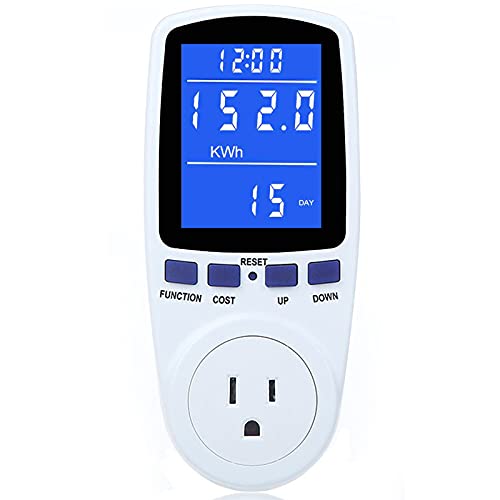
- Monitors power, energy, volts, amps, hertz, PF, and cost
- Large backlit display with wide viewing angles
- Stores data after unplugging or sudden power loss
Best For: Users who want detailed appliance-level energy tracking
App-Controlled Energy Plug
Govee Smart Plug with Energy Monitoring

- Tracks real-time power, current, and voltage in the app
- Works with Alexa and Google Assistant
- Includes scheduling, timer, and group control
Best For: Smart-home users who want monitoring and remote outlet control
Easy-Read Usage Meter

- Measures 9 data types including watts, kWh, and cost
- Backlit screen with 160° viewing angle
- Retains non-real-time data after outages
Best For: Buyers who want simple, readable appliance energy tracking
Non-Contact Panel Monitoring
SONOFF POWCT Smart Power Meter

- Split-core clamp measures up to 100A without direct wire contact.
- Tracks appliance or room energy use from the panel.
- Stores up to 6 months of historical data.
Best For: Homeowners wanting safer clamp-on panel monitoring
Multi-Circuit Cost Tracking
16-Sensor Smart Home Energy Monitor

- Comes with 16 clamp-on 50A sensors for circuit-level monitoring.
- Tracks real-time power use and electricity costs in the app.
- Supports Home Assistant, MQTT, and LAN-only privacy mode.
Best For: Rental homes and shared apartments needing fair bill allocation
Local-Control Solar Monitoring
Refoss Smart Home Energy Monitor

- Works locally with web UI, open API, and MQTT.
- Native Home Assistant integration needs no firmware flashing.
- Supports solar self-consumption automation and circuit alerts.
Best For: Privacy-focused smart homes and solar users
Whole-Home Monitoring Choice – Emporia Vue 3 Smart Home Energy Monitor
If you want a smart electrical consumption meter that tracks an entire home, the Emporia Vue 3 is built for detailed, real-time monitoring. It installs in most circuit panels with clamp-on sensors, supports solar and net metering, and is designed to help you spot where electricity is going so you can act on it.
Best For: Homeowners who want panel-level energy tracking with solar and net metering support.
Pros:
- UL Listed and CE Listed for added safety confidence
- Includes 16 branch sensors for monitoring key loads like HVAC, water heater, and laundry appliances
- App-based real-time data helps identify usage and savings opportunities
- Supports automation for time-of-use, peak demand, and rewards programs
Cons:
- Requires 2.4 GHz Wi-Fi and an internet connection
- Installation is panel-based, so it is more involved than plug-in meters
- Some system types need an additional 200A sensor sold separately
For buyers who need whole-home visibility rather than single-device readings, this is the most comprehensive option here. It combines safety certification, circuit-level detail, and cloud reporting in one monitoring setup.
Smart Plug Value Pack – TP-Link Tapo P110M Energy Monitoring Plug
For a simpler smart electrical consumption meter setup, the TP-Link Tapo P110M puts energy tracking inside a compact smart plug. It monitors connected devices through the app, estimates electricity costs, and adds scheduling features that can help shift high-use appliances to lower-cost times.
Best For: People who want energy monitoring for plug-in devices with broad smart home compatibility.
Pros:
- Matter-certified for use with major platforms like Alexa, Apple HomeKit, Google Home, and SmartThings
- Shows energy consumption with clear statistics and visuals in the app
- Can estimate bills and support scheduled operation for savings
- Includes overcharge prevention and power cutoff thresholds
Cons:
- 2.4 GHz Wi-Fi only
- Works only with plug-in devices, not whole-panel monitoring
- May be more than you need if you only want a basic watt reading
This is a strong pick if you want monitoring plus smart control in the same outlet device. The 4-pack format also makes it practical for tracking several appliances or rooms at once.
Basic Reading Pick – Suraielec Plug-In Watt Meter
If you need a straightforward smart electrical consumption meter without app setup, the Suraielec watt meter focuses on direct plug-in measurements. It shows watts, volts, amps, frequency, power factor, and kWh, then calculates cost based on your set electricity price.
Best For: Shoppers who want a simple plug-in meter for reading and calculating appliance usage.
Pros:
- Measures multiple electrical values, including power, voltage, current, and energy
- Auto cost calculator helps translate usage into estimated expense
- Backlit LCD makes readings easier to see in darker areas
- Rechargeable battery backup can retain data for up to 90 days
Cons:
- No Wi-Fi or smart app connectivity
- Single-outlet use only
- Not intended for whole-home or circuit-panel monitoring
This is the most direct option for hands-on electricity checks. It is best when you want accurate plug-level readings and cost estimates without adding a connected smart-home layer.
Voice-Controlled Outlet Pair – Govee Smart Plug Energy Monitor
The Govee smart plug is a practical smart electrical consumption meter for everyday appliances you want to automate and measure at the outlet. It tracks real-time power, current, and voltage in the Govee Home app, while adding timer, group control, and voice assistant support for easier routine use.
Best For: Home users who want affordable energy monitoring with remote control for plug-in devices.
Pros:
- Real-time monitoring of power, current, and voltage in the app
- Works with Alexa and Google Assistant for voice control
- Supports schedules and group control to automate daily routines
- FCC and ETL certified with fire-resistant materials
Cons:
- Does not support 5G Wi-Fi
- Only monitors devices that plug into the outlet
- Basic 2-pack format may be limiting for larger setups
For simple appliance-level monitoring, this model covers the essentials without adding complexity. It is a good fit if you want a combination of energy tracking, voice control, and easy scheduling in one compact smart plug.
Feature-Rich Plug-In Monitor – Upgraded Watt Power Meter Plug
If you want a smart electrical consumption meter that gives you a deeper look at what an appliance is doing, this plug-in monitor is built for that kind of hands-on tracking. It shows power, energy, voltage, amps, frequency, power factor, and cost, plus min/max power and runtime, so you can study usage in more detail.
Best For: Home users who want a feature-rich plug-in meter for monitoring appliance power draw, cost, and runtime.
Pros:
- Tracks 7 display modes plus power, kWh, volts, amps, hertz, power factor, and cost
- Large backlit LCD with 180° viewing angles for easier reading
- Adjustable backlight timing, including always-on mode
- Data memory keeps readings after unplugging or power loss
Cons:
- Overload protection may stop buttons from working until load is reduced
- Requires manual setup for backlight and overload settings
- Best suited to plug-in appliances rather than whole-home monitoring
Overall, this is a practical choice if you want a smart electrical consumption meter with broad measurement coverage and useful memory features. It is especially helpful for comparing appliance usage and estimating electricity cost over time.
App-Controlled Energy Plug – Govee Smart Plug with Energy Monitoring
This smart electrical consumption meter combines energy tracking with remote control, making it a good fit if you want to monitor and manage devices from your phone. The Govee Home App shows real-time power, current, and voltage, while WiFi and Bluetooth keep setup and control straightforward.
Best For: Anyone who wants energy monitoring plus app control, voice commands, and scheduling in one smart plug.
Pros:
- Real-time power, current, and voltage monitoring in the app
- Supports daily, weekly, monthly, and up-to-1-year energy review
- Works with Alexa and Google Assistant for voice control
- Timer and group control features help automate routines
Cons:
- Does not support 5G Wi-Fi
- Limited to plug-in devices rated for the outlet and 15A/120V specs
- Only one smart plug is included
As a monitoring and control tool, this plug stands out for convenience and app-based visibility. It is a strong option if your priority is checking consumption while also adding scheduling and voice control to a single outlet.
Easy-Read Usage Meter – HBN Watt Meter Plug
If you want a straightforward smart electrical consumption meter with a clear display and plenty of measurement modes, this HBN plug-in meter covers the essentials well. It tracks power, apparent power, energy use, runtime, frequency, power factor, voltage, current, and electricity cost, all from a simple one-button interface.
Best For: Shoppers who want an easy-to-read plug-in meter with broad measurement options and basic operation.
Pros:
- Shows 9 types of data, including watts, kWh, volts, amps, PF, and cost
- Backlit LCD with a 160° viewing angle for easier reading
- Stores non-real-time data during power outages
- Simple one-button navigation keeps operation easy
Cons:
- Backlight automatically turns off after 15 seconds of continuous use
- Basic plug-in format is not a whole-home monitor
- Display and controls are geared more toward utility than advanced smart features
For buyers who mainly want reliable consumption readings without extra app complexity, this meter keeps things practical. It is a solid pick for tracking appliance usage and estimating electricity cost from the outlet.
Non-Contact Panel Monitoring – SONOFF POWCT Smart Power Meter
If you want a smart electrical consumption meter for panel-based monitoring, the SONOFF POWCT is built around a split-core current transformer that clamps around live conductors without direct contact. It’s a practical pick for tracking household appliance or room usage, with real-time energy monitoring, an LCD display, and overload protection in a WiFi-connected setup.
Best For: Homeowners who want safer clamp-on monitoring and basic load control in an electrical panel.
Pros:
- Split-core CT design supports non-contact current detection up to 100A.
- Monitors electricity use for appliances or rooms directly from the circuit panel.
- Saves up to 6 months of historical usage data, even after power loss.
- Supports contactor control through a 2A dry contact relay.
Cons:
- Requires installation in the electrical panel.
- Primary control output is limited to a 2A dry contact relay for use with a contactor.
- Best suited to single-point panel monitoring rather than detailed multi-circuit tracking.
Overall, the POWCT is a strong fit if you want a safer, clamp-on smart power meter with useful history retention and load-control support. It focuses on core monitoring tasks without adding unnecessary complexity.
Multi-Circuit Cost Tracking – 16-Sensor Smart Home Energy Monitor
This smart electrical consumption meter is designed for whole-home and multi-circuit tracking, making it especially useful when you need to see how different rooms or appliances affect your bill. With 16 clamp-on 50A sensors, real-time usage and cost tracking, and Home Assistant support, it gives landlords, shared homes, and energy-conscious households a detailed view of consumption.
Best For: Rental homes, shared apartments, and users who need circuit-by-circuit electricity cost allocation.
Pros:
- Includes 16 circuit-level 50A sensors for monitoring multiple appliances and branch lines.
- Supports single-phase, split-phase, and three-phase panels with clamp-on installation.
- Tracks real-time power usage and electricity cost with app-based history.
- Can run with Home Assistant and MQTT, including a private LAN-only mode.
Cons:
- Installation is more involved than a single-circuit meter.
- Some panel setups may need flexible sensors for busbar-only access.
- Best value comes from users who will actually monitor multiple circuits.
For detailed energy accounting, this monitor stands out because it is built for more than simple whole-home readings. Its circuit-level design and cost allocation features make it a strong choice for managing shared usage fairly.
Local-Control Solar Monitoring – Refoss Smart Home Energy Monitor
If you’re shopping for a smart electrical consumption meter with strong local control, the Refoss monitor is built to work without cloud dependency. It offers a built-in web UI, open API, MQTT support, and native Home Assistant integration, while also adding solar self-consumption automation and circuit-level alerts for practical energy management.
Best For: Privacy-focused homes, Home Assistant users, and solar setups that want local automation.
Pros:
- No cloud required: supports local web UI, open API, and MQTT access.
- Native Home Assistant integration with no firmware flashing or complex coding.
- Works with solar homes to shift loads toward surplus midday power.
- Provides real-time monitoring with ±1% accuracy and long-term data storage.
Cons:
- Best features depend on Home Assistant or the Refoss app for automation.
- Installation still requires panel access and clamp-on sensor placement.
- Solar optimization is most useful for homes with existing PV systems.
This is a compelling option if local privacy and automation matter as much as consumption tracking. The combination of offline control, solar-aware scheduling, and detailed monitoring makes it well suited to modern smart homes.
How We Picked the Best Smart Electrical Consumption Meter
We prioritized models that provide clear real-time readings, useful energy history, and straightforward setup. For a Smart Electrical Consumption Meter, the most important factors are measurement type, app or display quality, compatibility, and whether the unit supports your load requirements.
We also considered protection features, cost-tracking tools, and whether the product is better suited for one appliance, multiple devices, or full-panel monitoring.
Quick Comparison
Plug-in meters are usually the easiest way to monitor one appliance at a time and are ideal for TVs, office gear, kitchen appliances, or entertainment setups. Smart plugs with energy monitoring add remote control and automation, while whole-home and circuit-level monitors are better when you need broader visibility across many devices or your entire electrical system.
Key Buying Factors for a Smart Electrical Consumption Meter
Monitoring Scope
Decide whether you need a single-outlet meter, a smart plug with usage data, or a whole-home system. Whole-panel and circuit-level solutions offer the best big-picture insights, but they typically require more installation effort.
Accuracy and Readability
Look for clear wattage, voltage, amperage, and cost estimates. A backlit display can help on plug-in units, while a well-designed app matters more for connected models.
Connectivity and Smart Features
Wi-Fi, Bluetooth, Matter, or app-based control can make daily use much easier. If you want automations, prioritize compatibility with Alexa, Google Assistant, or SmartThings.
Safety and Load Capacity
Make sure the meter can handle your appliance’s power draw and includes overload protection when possible. For higher-demand devices or circuit monitoring, safety ratings matter just as much as convenience.
Who Should Buy Which Smart Electrical Consumption Meter?
If you mainly want to measure a few appliances, a plug-in monitor or smart plug with energy tracking is usually the best choice. If you want to track an entire home, rental property, or multiple circuits, choose a panel-level Smart Electrical Consumption Meter instead.
For users who care most about local control and reduced cloud dependence, look for systems with open APIs or web-based dashboards. If your goal is simple savings, start with the easiest setup that gives you reliable visibility into where electricity is going.